
 DTF Gang Sheet Artwork Requirements & File Setup Guide
 DTF Gang Sheet Artwork Requirements & File Setup Guide
When preparing artwork for DTF gang sheet printing, correct file setup and realistic colour expectations are essential for achieving reliable, high-quality results.
This guide outlines our artwork requirements, file setup standards, advanced editing considerations, and DTF colour system limitations, helping you avoid common issues such as print defects, unexpected colour shifts, or production delays.
Whether you are a designer, apparel decorator, or experienced print professional, following these guidelines ensures your gang sheets are printed accurately and efficiently.
File Submission Requirements
Please upload or email your print-ready DTF gang sheet file to:
print@dtfhub-com-au.preview-domain.com
Accepted File Format
PNG (recommended)
300 DPI
Transparent background
PDF (vector-based preferred)
AI / EPS
PSD (flattened layers recommended)
- JPG is not accepted
File Resolution
Minimum: 300 DPI at final print size
- Upscaling low-resolution artwork will result in blurred or pixelated prints.
Transparency & Backgrounds
- Artwork must have a transparent background
- Do not add artificial white backgrounds
- White ink is automatically generated during the DTF printing process
Artwork Dimensions
Width: 58 cm (fixed)
Height: Any length up to 5 metres
Files must be supplied at the exact print size.
We do not resize, redesign, or adjust artwork unless a design service is requested.

Artwork Quality Guidelines
DTF printing has specific technical limitations. To avoid print issues, please ensure:
No semi-transparency or soft opacity effects
No extremely thin lines or micro text
All elements are clearly defined and high resolution

All DTF transfers are printed exactly as supplied.
Print quality cannot be guaranteed if artwork does not meet these standards.
Large File Transfers
For files larger than 10MB, please submit your artwork via WeTransfer.
DIY Gang Sheet Builder (Optional)
If you prefer to prepare your own layout, we offer a free DIY DTF Gang Sheet Builder to help you arrange designs correctly before exporting a print-ready PNG file.
Professional Gang Sheet Setup Service
If you require assistance with layout:
Please send:
All individual artwork files
Each file clearly named with size and quantity (QTY)
Our team will professionally arrange your gang sheet according to printing requirements.
Advanced DTF Gang Sheet Editing Skills
(For Consistent Quality & Long-Term Durability)
The following guidelines cover advanced production-level considerations. These are especially important when working with small text, thin lines, or mixed design elements.
Recommended File Formats & Size Limits
PNG Files (Strongly Recommended)
300 DPI
Transparent background
Maximum size: 58 cm (W) × 500 cm (L)
PNG files provide the most reliable control over white base settings and fine details.
Vector PDF Files (Use with Caution)
Maximum size: 58 cm (W) × 250 cm (L)
Long vector PDFs increase the risk of white base inconsistencies and processing errors in DTF workflows.

Do Not Mix Large & Small Elements in One File (Critical)
Please separate:
Large, bold logos or solid graphics
Very small text or thin line elements
Why this matters
Large graphics and fine details require different white base choke settings.
Combining them in one file can result in:
Small text disappearing
Unwanted white outlines
Weak adhesion in fine details
Always supply these elements as separate files.

Separate White vs Coloured Small Text (Important)
For small fonts or thin lines, please supply:
One file for white-only small text or lines
One file for coloured small text or lines
Why this matters
White and coloured elements require different white choke values.
Separating them allows precise adjustment so that:
White text remains visible
Coloured text does not show white edges
Minimum Line & Text Thickness (Adhesion Safety)
Recommended minimum: 0.6 mm
Absolute minimum: 0.5 mm
Elements thinner than 0.5 mm may not hold enough adhesive powder, which can lead to:
Peeling
Poor bonding
Failure during heat pressing
For best durability, avoid anything below 0.5 mm entirely.
Before You Upload – Final Checklist
Before submitting your file, please confirm:
PNG format, 300 DPI, transparent background
58 cm fixed width, correct final size
No semi-transparency or ultra-thin details
Large graphics separated from small text
White small text separated from coloured small text
Print Responsibility & Limitations
All DTF gang sheets are printed exactly as supplied.
By submitting artwork, you acknowledge that print results are subject to the technical limitations of DTF printing and the quality of the files provided.
Copyright & Usage Responsibility
Please ensure you have the legal rights to use all submitted artwork.
We do not verify copyright ownership and accept no liability for copyright infringement.
By submitting files, you confirm that you own the rights or have permission to use the images for printing.
Colour Matching & Colour System Limitations
(Important Before You Design)
Colour accuracy is one of the most common concerns in DTF printing.
To avoid misunderstandings, it is important to understand how screen colours, print colour systems, and physical ink limitations work.
Color Accuracy Notice: Why “What You See” is Not Always “What You Get”
A common challenge in the DTF industry is the discrepancy between colors seen on a digital screen and the final printed result. This occurs because screens display colors in RGB (light-based), while DTF printing uses CMYK (ink-based). These two color spaces have different gamuts, meaning some vibrant colors on your monitor simply cannot be perfectly replicated with physical ink. To achieve the best results, we recommend designing your artwork within the CMYK color space..
RGB vs CMYK – Screen Colours vs Print Colours
Designs viewed on a screen are displayed using the RGB (Red, Green, Blue) colour model, which is fundamentally different from the CMYK (Cyan, Magenta, Yellow, Black) colour model used in printing.
RGB is a light-based colour system used by monitors, phones, and tablets
CMYK is an ink-based colour system used by printers
Because RGB uses light, it has a much wider colour gamut, especially in:
Bright blues
Neon greens
Vivid purples
These colours cannot always be reproduced accurately in CMYK printing.
As a result, it is not possible to colour-match prints solely based on how colours appear on a screen, even if the screen looks calibrated.
While PNGs are RGB files, please ensure your design uses colors within the CMYK printable gamut to avoid unexpected color shifts during printing.
Learn more from authoritative sources:
Adobe – RGB vs CMYK explained:
Understanding Photoshop color modesWikipedia – RGB colour model:
https://en.wikipedia.org/wiki/RGB_color_modelWikipedia – CMYK colour model:
https://en.wikipedia.org/wiki/CMYK_color_model
Pantone (PMS) vs CMYK – Spot Colours vs Process Printing
Pantone (PMS) colours are part of a separate, standardised spot colour system, designed to achieve highly specific colours using pre-mixed inks.
Many Pantone colours:
Use special pigments
Fall outside the printable CMYK colour gamut
Cannot be reproduced exactly using CMYK inks alone
While we can aim to visually match or get close to a requested Pantone colour, exact Pantone-to-CMYK matching is not always achievable, especially for:
Fluorescent colours
Extremely bright blues and greens
Highly saturated spot colours
Authoritative references:
Pantone – What is a Pantone Colour?
PANTONE® USA | Pantone Color Systems – IntroductionWikipedia – Pantone Matching System:
https://en.wikipedia.org/wiki/Pantone
Our ICC Profile & Professional Colour Calibration
Our DTF printing system uses custom-calibrated ICC profiles to ensure consistent and accurate CMYK reproduction.
These ICC profiles are created using:
Professional colour measurement equipment – Barbieri Spectro LFP
https://www.barbierielectronic.com/spectro-lfpCarefully matched combinations of our brand DTFhub consumables:
High-quality DTF inks
DTF Ink (DTFhub) CMYK+WProfessional DTF transfer films
DTF Transfer Film Sheet (DTFhub)
Through extensive testing and calibration, our ICC profiles are optimised to:
Accurately reproduce international CMYK standards
Deliver consistent colour output across prints
Minimise unexpected colour shifts
For best results, we strongly recommend designing artwork in CMYK colour mode rather than RGB.

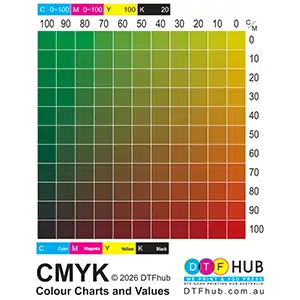
CMYK Colour Chart | CMYK Printed Colour Sample (Strongly Recommended)
If precise colour reference is required, we recommend purchasing our CMYK Colour Chart | physical CMYK printed colour sample.
Length: 2 metres
Printed using our production ICC profile
Provides a real-world reference for:
Colour selection
Design adjustments
Customer approval before full production
DTF Gang Sheet Transfer CMYK Colour Chart (ICC Profile Matched)
Using a physical colour sample is the only reliable way to evaluate printed colours, as screen previews cannot accurately represent final printed output.
Important Colour Disclaimer
Due to the inherent differences between RGB, CMYK, and Pantone colour systems:
Exact colour matching based on screen display is not guaranteed
Pantone colours may only be approximated, not perfectly matched
Final print results depend on:
Colour system used in the design
File preparation
Printing material limitations
All artwork is printed as supplied, using our calibrated CMYK workflow.
DTF Gang Sheet Artwork Requirements & File Setup Guide
When preparing artwork for DTF gang sheet printing, correct file setup and realistic colour expectations are essential for achieving reliable, high-quality results.
This guide outlines our artwork requirements, file setup standards, advanced editing considerations, and DTF colour system limitations, helping you avoid common issues such as print defects, unexpected colour shifts, or production delays.
Whether you are a designer, apparel decorator, or experienced print professional, following these guidelines ensures your gang sheets are printed accurately and efficiently.
File Submission Requirements
Please upload or email your print-ready DTF gang sheet file to:
print@dtfhub-com-au.preview-domain.com
Accepted File Format
PNG (recommended)
300 DPI
Transparent background
PDF (vector-based preferred)
AI / EPS
PSD (flattened layers recommended)
- JPG is not accepted
File Resolution
Minimum: 300 DPI at final print size
- Upscaling low-resolution artwork will result in blurred or pixelated prints.
Transparency & Backgrounds
- Artwork must have a transparent background
- Do not add artificial white backgrounds
- White ink is automatically generated during the DTF printing process
Artwork Dimensions
Width: 58 cm (fixed)
Height: Any length up to 5 metres
Files must be supplied at the exact print size.
We do not resize, redesign, or adjust artwork unless a design service is requested.
Artwork Quality Guidelines
DTF printing has specific technical limitations. To avoid print issues, please ensure:
No semi-transparency or soft opacity effects
No extremely thin lines or micro text
All elements are clearly defined and high resolution
All DTF transfers are printed exactly as supplied.
Print quality cannot be guaranteed if artwork does not meet these standards.
Large File Transfers
For files larger than 10MB, please submit your artwork via WeTransfer.
DIY Gang Sheet Builder (Optional)
If you prefer to prepare your own layout, we offer a free DIY DTF Gang Sheet Builder to help you arrange designs correctly before exporting a print-ready PNG file.
Professional Gang Sheet Setup Service
If you require assistance with layout:
Please send:
All individual artwork files
Each file clearly named with size and quantity (QTY)
Our team will professionally arrange your gang sheet according to printing requirements.
Advanced DTF Gang Sheet Editing Skills
(For Consistent Quality & Long-Term Durability)
The following guidelines cover advanced production-level considerations. These are especially important when working with small text, thin lines, or mixed design elements.
Recommended File Formats & Size Limits
PNG Files (Strongly Recommended)
300 DPI
Transparent background
Maximum size: 58 cm (W) × 500 cm (L)
PNG files provide the most reliable control over white base settings and fine details.
Vector PDF Files (Use with Caution)
Maximum size: 58 cm (W) × 250 cm (L)
Long vector PDFs increase the risk of white base inconsistencies and processing errors in DTF workflows.
Do Not Mix Large & Small Elements in One File (Critical)
Please separate:
Large, bold logos or solid graphics
Very small text or thin line elements
Why this matters
Large graphics and fine details require different white base choke settings.
Combining them in one file can result in:
Small text disappearing
Unwanted white outlines
Weak adhesion in fine details
Always supply these elements as separate files.
Separate White vs Coloured Small Text (Important)
For small fonts or thin lines, please supply:
One file for white-only small text or lines
One file for coloured small text or lines
Why this matters
White and coloured elements require different white choke values.
Separating them allows precise adjustment so that:
White text remains visible
Coloured text does not show white edges
Minimum Line & Text Thickness (Adhesion Safety)
Recommended minimum: 0.6 mm
Absolute minimum: 0.5 mm
Elements thinner than 0.5 mm may not hold enough adhesive powder, which can lead to:
Peeling
Poor bonding
Failure during heat pressing
For best durability, avoid anything below 0.5 mm entirely.
Before You Upload – Final Checklist
Before submitting your file, please confirm:
PNG format, 300 DPI, transparent background
58 cm fixed width, correct final size
No semi-transparency or ultra-thin details
Large graphics separated from small text
White small text separated from coloured small text
Print Responsibility & Limitations
All DTF gang sheets are printed exactly as supplied.
By submitting artwork, you acknowledge that print results are subject to the technical limitations of DTF printing and the quality of the files provided.
Copyright & Usage Responsibility
Please ensure you have the legal rights to use all submitted artwork.
We do not verify copyright ownership and accept no liability for copyright infringement.
By submitting files, you confirm that you own the rights or have permission to use the images for printing.
Colour Matching & Colour System Limitations
(Important Before You Design)
Colour accuracy is one of the most common concerns in DTF printing.
To avoid misunderstandings, it is important to understand how screen colours, print colour systems, and physical ink limitations work.
Color Accuracy Notice: Why “What You See” is Not Always “What You Get”
A common challenge in the DTF industry is the discrepancy between colors seen on a digital screen and the final printed result. This occurs because screens display colors in RGB (light-based), while DTF printing uses CMYK (ink-based). These two color spaces have different gamuts, meaning some vibrant colors on your monitor simply cannot be perfectly replicated with physical ink. To achieve the best results, we recommend designing your artwork within the CMYK color space..
RGB vs CMYK – Screen Colours vs Print Colours
Designs viewed on a screen are displayed using the RGB (Red, Green, Blue) colour model, which is fundamentally different from the CMYK (Cyan, Magenta, Yellow, Black) colour model used in printing.
RGB is a light-based colour system used by monitors, phones, and tablets
CMYK is an ink-based colour system used by printers
Because RGB uses light, it has a much wider colour gamut, especially in:
Bright blues
Neon greens
Vivid purples
These colours cannot always be reproduced accurately in CMYK printing.
As a result, it is not possible to colour-match prints solely based on how colours appear on a screen, even if the screen looks calibrated.
While PNGs are RGB files, please ensure your design uses colors within the CMYK printable gamut to avoid unexpected color shifts during printing.
Learn more from authoritative sources:
Adobe – RGB vs CMYK explained:
Understanding Photoshop color modesWikipedia – RGB colour model:
https://en.wikipedia.org/wiki/RGB_color_modelWikipedia – CMYK colour model:
https://en.wikipedia.org/wiki/CMYK_color_model
Pantone (PMS) vs CMYK – Spot Colours vs Process Printing
Pantone (PMS) colours are part of a separate, standardised spot colour system, designed to achieve highly specific colours using pre-mixed inks.
Many Pantone colours:
Use special pigments
Fall outside the printable CMYK colour gamut
Cannot be reproduced exactly using CMYK inks alone
While we can aim to visually match or get close to a requested Pantone colour, exact Pantone-to-CMYK matching is not always achievable, especially for:
Fluorescent colours
Extremely bright blues and greens
Highly saturated spot colours
Authoritative references:
Pantone – What is a Pantone Colour?
PANTONE® USA | Pantone Color Systems – IntroductionWikipedia – Pantone Matching System:
https://en.wikipedia.org/wiki/Pantone
Our ICC Profile & Professional Colour Calibration
Our DTF printing system uses custom-calibrated ICC profiles to ensure consistent and accurate CMYK reproduction.
These ICC profiles are created using:
Professional colour measurement equipment – Barbieri Spectro LFP
https://www.barbierielectronic.com/spectro-lfpCarefully matched combinations of our brand DTFhub consumables:
High-quality DTF inks
DTF Ink (DTFhub) CMYK+WProfessional DTF transfer films
DTF Transfer Film Sheet (DTFhub)
Through extensive testing and calibration, our ICC profiles are optimised to:
Accurately reproduce international CMYK standards
Deliver consistent colour output across prints
Minimise unexpected colour shifts
For best results, we strongly recommend designing artwork in CMYK colour mode rather than RGB.
CMYK Colour Chart | CMYK Printed Colour Sample (Strongly Recommended)
If precise colour reference is required, we recommend purchasing our CMYK Colour Chart | physical CMYK printed colour sample.
Length: 2 metres
Printed using our production ICC profile
Provides a real-world reference for:
Colour selection
Design adjustments
Customer approval before full production
DTF Gang Sheet Transfer CMYK Colour Chart (ICC Profile Matched)
Using a physical colour sample is the only reliable way to evaluate printed colours, as screen previews cannot accurately represent final printed output.
Important Colour Disclaimer
Due to the inherent differences between RGB, CMYK, and Pantone colour systems:
Exact colour matching based on screen display is not guaranteed
Pantone colours may only be approximated, not perfectly matched
Final print results depend on:
Colour system used in the design
File preparation
Printing material limitations
All artwork is printed as supplied, using our calibrated CMYK workflow.